
I had seen many comments from our readers about kids or someone else accidentally deleted an app from the iPhone or iPAD. Do you know you still have the app as long as you have downloaded once, even if it is not on your device? How to get the app back to your device? It is actually quite simple, once you know it.
1. Go to App Store on your device.
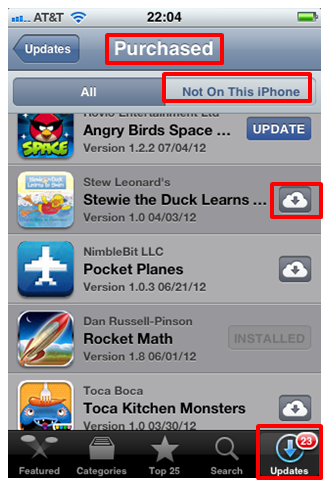
2. Tap on “Purchased” at the bottom of the screen. On iPhone, it is hidden under “updates” at the bottom right corner of the screen. Once you tapped “updates”, you will see “purchased” at the top of the screen.
3. When you are in “Purchased” section, you will see two taps – “All” and “Not on this Device”. Tap on “Not on this device”. Here you will see all the apps you downloaded, but are not on this device. They could be the ones that are accidentally deleted, or the apps you downloaded on a different device. If tap on “All”, you will see all the apps you ever downloaded. Those with greyed out “installed” button next to them are the one on your device. Those with a cloud button next to them are the ones not on this device.
4. If you want to get the app back on your device, tap the little cloud next to the app. Now you get the app back on your device again.
Note: this will get the app back, but not the usage data. For example, if you have played a game to a certain level before it was deleted, you won’t see your previous scores any more. You have to start the game again from ground zero. You might be able to keep the scores if it is deleted right after you sync the device. I did not try that and am not sure about it.
This feature is not only good for recovering lost apps. It is also helpful if you have apps on multiple devices. In addition, once you get good at recovering the apps, you can delete apps that are not used much to free up space on your device. When you need the app again, you know how to get it back.



Great information! Thank you! Just shared your link on my FB & Twitter page.
Thanks for sharing igamemom info!
Thanks for the info and a great blog packed with ideas!
Thanks for note. Glad you find the app reviews helpful.
This info came in handy for us. Thanks for sharing!
Thanks! Come back often for more app tips and recommendations!
Thanks for visiting my blog. This was a very helpful tip. I’m not “app-t” at all with smart phones, but, thanks to you, now able to answer some friends’ questions.
and when you actually get one, you are equipped with the knowledge that can minimize the potential frustrations 🙂
Super super helpful! I will search for my lost apps and probably find a bunch of missing socks back there too. Cheers
It is also good for moving apps from one device to another.
This is great info (as always). Thanks, iGameMom!
🙂
Very good info! Thanks for liking my post =) Love this blog, by the way!