
iLuv Drawing Animals – Learn to draw 40 animals is a great app teaching kids how to draw animals. The step-by-step guide is intuitive and easy to follow, the coloring and background options make the process more enjoyable and more rewarding. When the kids finish their masterpieces, they can save it to their drawing books, or share with family and friends.
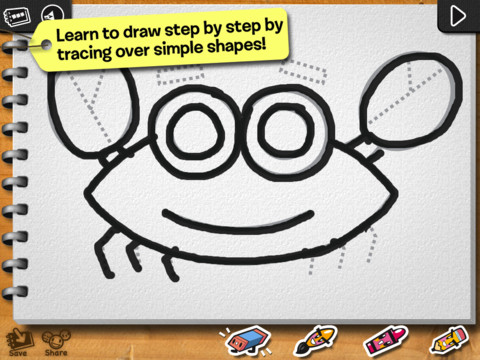
The best part of the app is the step by step guide. It breaks down the whole picture into smaller parts, and has kids draw one part at a time. For example, to draw a crab, the kids are asked to draw the two circles for eyes, tracing the grey lines on the screen. Once they finish the eyes, they can tap the “next” button on the top-right corner of the screen. Then the grey lines for the body appear on the screen, a kid-friendly voice tells the kids “now let’s draw his body”. Then mouth, then legs, … With the help of the trace line, kids have a sense where each part should be, and how big each part should be. After they finish drawing, kids can decorate the picture by colors, stickers, and backgrounds. There is an eraser. If the kids don’t like certain part of the picture, they can erase that part and re-draw that part.
Here is the complete list of the features from the app store:
• Learn to draw by tracing over step by step templates.
• Very intuitive and easy to use interface.
• Friendly voice instructions.
• 40 popular animals to choose from.
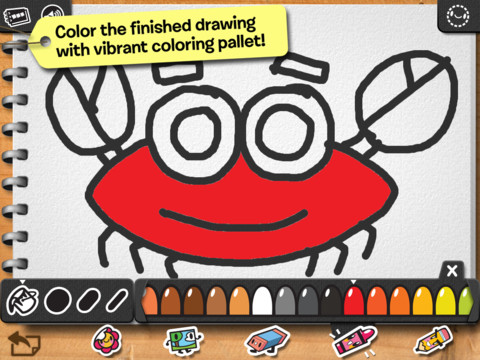
• A vibrant coloring pallet to color the finished drawing.
• Combined brush and color pallet.
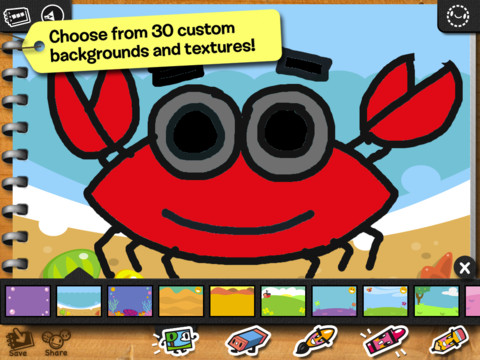
• 30 custom backgrounds and textures to add to the finished drawing.
• Add stickers to the drawing.
• Editing tools such as eraser, redo, undo, start over.
• Save in a drawing book or photos.
• Print your masterpiece.
• Ability to edit the saved drawing.
• Blank pages to practice what you learned or freehand drawing.
What the kids can learn:
• Art and creativity, right brain thinking.
• Basic building blocks of a drawing.
• Fine motor skills for younger audience.
How parents can help:
• Taking turns with kids to draw pictures
• Print out their art pieces and put them up at home and work, make kids feel proud of their work
iGameMom Comments:
iLuv Drawing Animals is a great app teaching the basics of drawing – lines, shapes, colors, and how to put them together to form a picture. All these are done in a way that encourages the interest in drawing more. There are 40 animals to choose from, so kids won’t get bored for a long time.
It is suggested for kids age 4 and up. It is available on iPAD. Currently it is $2.99 at App Store.
If you would like to check it out or purchase it, please use the App Store link provided below. The cost is the same to you, but iGameMom gets a small percentage. Thanks for your support!
Check it out at App Store: 


Your blog is very creative! Any dogs? Lol
Of course! Hard to imagine that dog is not included in the 40+ animals! Check it out …
I got this for myself. I am 61 & wish I knew how to draw.
Ha, I am learning drawing picture with this app too! 🙂
Looks like a good family game for those creative kiddos, and adults 🙂
yes, have a family drawing competition and share them with friends! This app makes it possible.
Hi,
Thank you for stopping by my blog! Sadly, my kids are grown now, but my daughter especially would have loved this app!
Hey, I am using this app for myself 🙂 Of course, my son also likes it.
Thanks for taking the time to stop by my blog and like the last post, much appreciated. Love what you blog is about.
This looks like it could help me learn to draw a little better!
This is what I am doing 🙂 … I wish I had it when my son was younger, so I can draw with him. I can still do it now, but mostly he’d do it by himself.
Thanks for stopping by my blog! This seems like a great activity which will encourage fine motor skills. It’s perfect for these long summer days!
The app does offer opportunity for finger exercises, and all the drawings are at the right difficulty level for the little fingers.
Hi, not so relevant to my kids becos they’re grown up but my 8 yr old nephew just got a new ipad so I’ll pass this info onto my sister. Secondly….I reckon if I had an ipad I’d be buying it for my little old self….what fun it sounds like. Thks Leanne
I didn’t say it in the post, but I am learning to draw the animals following the app instructions now …