

I had the App “Find my friend” on my phone for a long time, but I did not use it until recently. All incidences were quite interesting. I thought I should share with everyone.
First incidence: found family members at a busy outdoor event
It was a busy event. My husband and I went to different directions. He called me on my cell, of course. However, it was hard to tell where each of us was, relative to each other. He turned on Find My Friend. Being able to see my location relative to his on the map, he was able to move to the right direction to find me. It turned out, we were not that far away from each other at all. However, without the app, it may take us a little longer to find each other.
With this incidence, I know I will definitely keep this app on for our next Disney vacation!
Second incidence: Find my “lost” phone
I am getting very forgetful lately. 🙂 Not a good thing, I know. The other day, I could not find my phone, and I could not remember where I put 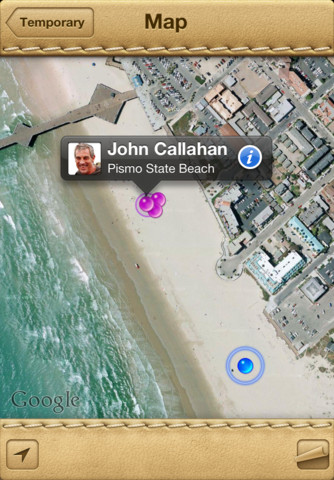 it. I checked the car, walked through the house, … Luckily, I still have my iPAD. I opened the Find My Friend app – I saw my phone on the map – it was in the house! A big relieve …
Third incidence: found out where I am !!
I was driving to one place. It was my first time going there. I thought I was on the right street, but the driving took longer than I thought. I was concerned… and of course, I called my husband. Instead of asking me where I was (he knew I would not be able to tell him, if I knew, why am I calling him? :-)), he turned on the Find My Friend app, saw where I was, and told me keep driving and I should see the place in about half miles. How cool is that!
After this incidence, I thought about some other potential places this app could be helpful: if you child need go out at night or drive far away, have him/her take an iPhone/iPod/iPAD with Find My Friend installed and turned on. You will be able to check where he/she is at every second.
I hope with my interesting experience of this Find My Friend app, you are convinced to have it on all your iDevices – iPhone, iPod, iPAD. It is free.
Other features this app has:
- You can choose to temporally share your location and set the time you want to share. It can be a couple hours, or several days.
- You decide if you want to share your location with a friend. If I want to see your location, I have to get your permission by sending you an email. I won’t see your location till you accept my request.
- It is FREE.
If you would like to check it out or purchase it, please use the App Store button provided below. The cost is the same to you, but iGameMom gets a small percentage. Thanks for your support! Note: The button works for all countries.

If You Liked This Post and Want to Stay Updated on App News and Reviews, Please Sign Up for Email Updates: 




Plz tell me how can i download phone location app. can i find out my friend where is?
Easiest is to open this post on your iPhone or iPAD, then use the App Store button provided at the bottom of this post. If you still have problem, please let me know.
Thanks -very useful!
Nice tips!
Thank you. Come back more for more app tips.
Is there a similar app for Android?
check out Google Latitude
I LOVE this app! My daughter is downloading to her iphone as I type this comment. Thank you, once again, for such fantastic and enlightening information.
Glad you find it helpful. Rememeber though – you have to have the app on your phone also, and you want to send her an friend request, and make sure she accepts the request. Then you are ready to go.
Thanks for the info- awesome.
You are welcome. It is a nice-to-have app 🙂
Now my Big Brother really can be watching :o)
Yes, only if you give him permission. 🙂
Wow, now that sounds like an app I need! I will have to poke around and see if my windows phone offers something similar.
I heard there is a “locate my phone” feature on Windows phone that lets you log into http://www.live.com and track the location of your phone. There is an app call “locate me” for Windows phone, but I had never tried or heard anyone who used it.
I’ve heard about this app but now I’m going to get it. I haven’t had a need for it, but you’ve shown me it might actually come in handy.
I have to thank my husband for putting this app on all our iDevices. Make sure connect your device with someone – find someone else and ask him/her to install the app as well, ask him/her send you an email from the app, and you accept the email request. Then your device can be found on your friend’s device. It sounds like a lot work, but actually quite easy and only takes two minutes.
It is, isn’t it? Now I know what the app can do, I probably will find more opportunities to use it.
Must have this app! I lose my iPod ALL the time. Thanks 🙂
Ha, you are just like me! 🙂 This app will give you some peace of mind.
Really interesting
I love this app! Haven’t had to use it yet in 2 years… fingers crossed, I never will! But, just in case!
This is like buying insurance. You buy insurance, but hope you will never use it.