
Learn Times Table is a key stage for kids to get fluent in math. As my son’s math teacher told me, you want the child be able to memorize the basic facts, so he can tell you the answer without even thinking about it. This is not an easy job. Luckily, there are quite some tools helping kids to achieve the goal, MultiFlow is one of them.
MultiFlow is an app to drill the kids on multiplication facts. There are 4 ways to use the apps.
Enter the flow: Kids answer questions of products of two random numbers between 1 and 20. There are two modes: Normal – users have 5 seconds to answer the question; Beginner – users have 10 seconds to answer each question. The questions will adjust to your level. If you answer most questions right, you will get more difficult ones, such as products of two numbers between 15 and 20.
Pick ‘EM: This is good for practice. There is no time limit on each question, so no speed pressure. Kids can pick which table they want to practice. For example, if they want to practice multiples of 8, they can just pick 8. They can also decide if they want to practice multiples of 8 within 12, or 20. If they pick multiples of 8 within 12, the largest number they will see in the practice is “12 x 8”.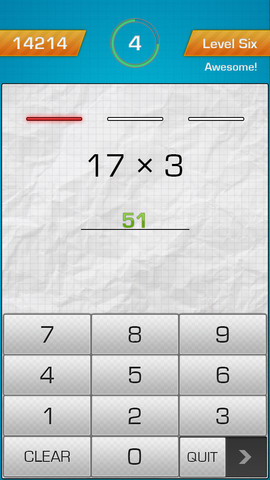
Mad Minute: See how many questions the child can answer in 60 seconds. Kids can choose “Easy” or “Hard” mode. In “Easy” mode, they will only see questions within 12. In “Hard” mode, they will see questions for numbers up to 20.
Reversals: Answer the questions backwards. Kids will see the products, and 4 equations. Their job is to pick the right equation that matches the given product.
iGameMom Comments:
MultiFlow is a good tool to help your child get efficient in multiplications. I like the flexibility that you can adjust the practice to meet your child’s need. The flow of the practice is quite smooth once you start a session. If for any reason you want to stop practice during a session, simply tap and hold the “Quit” button at the bottom, and slide it to the right.
The app let you connect to Game Center. If you don’t want your child be exposed to strangers online, make sure don’t log into Game Center.
MultiFlow works on iPhone, iPod, and iPAD. It is $1.99 at App Store.
If you would like to check it out or purchase it, please use the App Store button provided below. The cost is the same to you, but iGameMom gets a small percentage. Thanks for your support! Note: The button works for all countries.




Just so everyone knows, we have a similar product to MultiFlow called FlowPlus which handles addition and subtraction. Maybe your kids aren’t ready for times tables but they’re ready to add and subtract?
Check out the app here –> FlowPlus App
Thanks for sharing. It is good to know.
I’m always looking for a math app for my son who is in grade 4.
This one sounds promising because it actually lets you choose which table you want to practice–something most of these table apps don’t do!!!
That is what I really about MultiFlow. You can choose what you want to practice, and do it at your own pace.
What a terrific app! Thank you 🙂
Enjoy!
My granddaughter really needs this app! She loves to play games but has a hard time with math. What a great way to put the two together!
Try it out, please let me know how she likes it.
Sounds like an interesting app! I used to have another app to improve my niece’s math abilities, bu it was boring and there was no challenge or whatsover. This definitely looks better! I can even practice my own speed~
A very good app helping kids on the multiplications.
Thanks for the recommendation. My son is just starting to learn this in his math class.
MultiFlow is a good app to try. If he just start learning multiplication, you want to tart with the practice section, start with one table at a time, so he is not overwhelmed.
Thanks so much for the review!
I hope this app helps you and your children/students see great improvements in fluency with times tables.
I just wanted to let the community know that the Quit button is a ‘slider’ button. To quit the game you slide the Quit button to the right. We didn’t make it a ‘tap’ button because we didn’t want anyone accidentally quitting the game and getting frustrated. However, we have gotten valuable feedback from you now, that the Quit button’s function is ambiguous and the way to use it is not explicitly clear. We’ll work on making this clearer in an update.
Thanks again!
Thanks for explaining the Quit button. Now I see, you slide the “Quit” to the right, not the “arrow”. 🙂
This is awesome. I need this urgent!
I love how easy and practical it is. Thank you!!!
I like it that you can set the pace at your kids’ level, and choose which table you want your child to work on. Enjoy the app!
This is exactly what we need right now, thank you! The kid’s teacher is telling us to practice, but we’re having trouble finding a good option online. 🙂
Hope this app can help.
Really great review! Thanks!
Sounds great
sounds like a great app for my kid! thanks!
Very practical app that you see results after just couple days practice.