

After loading so many apps on my iPhone and iPAD, I got a warning saying my storage space is near the max. Here is what I did to free up space on my iPhone and iPAD:
1. Move all the photos to Dropbox. If you have not set up a Dropbox account, you really should. You can save files there and access the files from anywhere.
2. Go to Video on iPhone and iPAD, and clean up all the video files there, such as old home movies.
3. Go to Music on iPhone and iPAD, and delete the music files I have not been listening to. Actually, most times, I just listen to NPR on my phone, I should just delete all the music files.
4. Find the apps that are taking up big space and selectively delete them. Here is how:
- Go to Setting, then tap on General on the left panel
- Tap Usage on the right panel
- Wait for device update your storage data. This may take a while. Once the data is loaded, you will see a list of all the apps you have on your device, starting with the one taking the largest space.
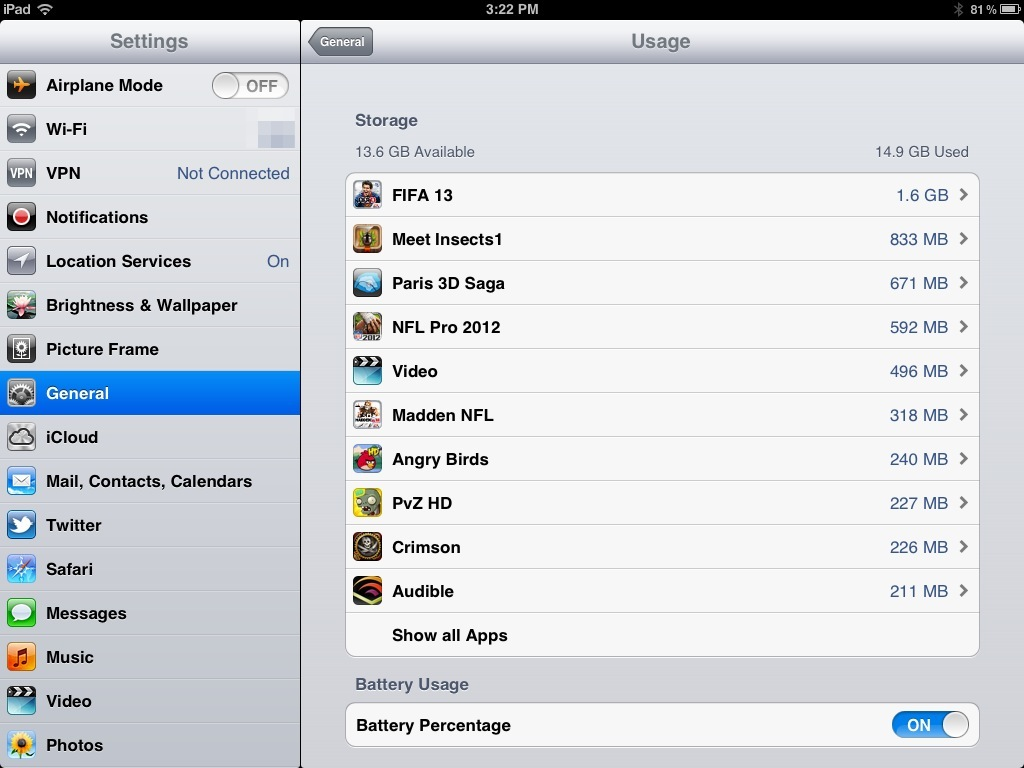
- Go through the list, delete the apps you don’t use any more, or you don’t think you will use in the near future.
- Note: although you delete the apps from your device, they are still yours. You can re-download them onto your device anytime, and there is no charge on re-downloads. You can go here for detailed instructions.
Did you ever run into storage space issue? What did you do to free up the storage space on your iDevice?




Thanks again for the great info. Do you have a post on making an iPhone childproof?? My five year old loves to ‘type notes’ and push that garbage can button…
Check out the post on “how to child-proof iPAD“. For iPhone, it is about the same.
I had planned to deal with this very issue on my Iphone tonight, so it was just perfect to come across your post! Thank you! By the way, – I like your blog!! Keep up the good work! 🙂
Perfect timing! I have to do this more often.
I keep running into this issue – thanks for the tips!
I am facing this issue right now. Thanks for the tip about Dropbox, I will definitely try to offload my photos and videos there.
It is great.
Thank you for your continued support of my blog. And thanks for the ideas you offer here—apps move faster than we can keep up with!
This was really helpful. Thanks! I shared it on Facebook because I’m sure lots of people run into this problem.
Thanks for sharing the tips from iGameMom. Glad you find it helpful.